
Shift templates
Morning, afternoon, night — each with its own hours, including shifts past midnight.
Create shift templates, set a pattern for each employee, and let the schedule run itself. Employees see it on their phone and can request shift swaps.
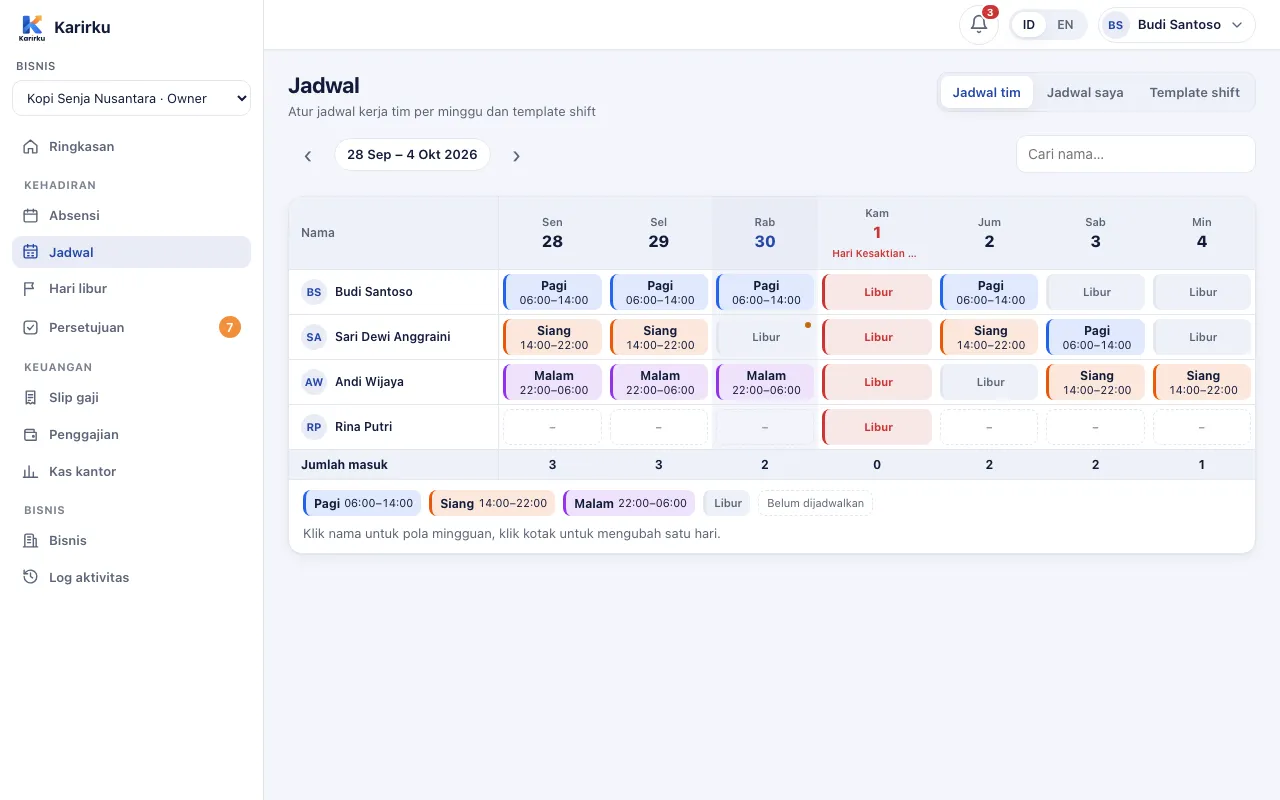
Morning, afternoon, night — each with its own hours, including shifts past midnight.
Weekly patterns repeating every 1–8 weeks, or daily rotations for teams that work in turns.
Change one date without breaking the pattern.
Import national holidays, or add your own business holidays.
Employees ask a teammate to swap. Manager approval can be required or skipped.
Employees can swap their own schedule between two dates, still with approval.
This week's shifts, holidays, and leave marks show in every employee's app.
See the whole team per week, including who's on leave.
Yes. Use weekly patterns repeating up to 8 weeks, or daily rotations up to 56 days, starting on a date you choose.
The employee picks a date and a teammate in the app. The teammate accepts, then a manager approves — or the schedule swaps right away if approval is turned off.
Indonesian national holidays can be imported in one click, then adjusted for your business.
The Perintis plan is free forever for up to 20 employees, no credit card. Set up your business on the web dashboard while the app is on its way to Google Play.